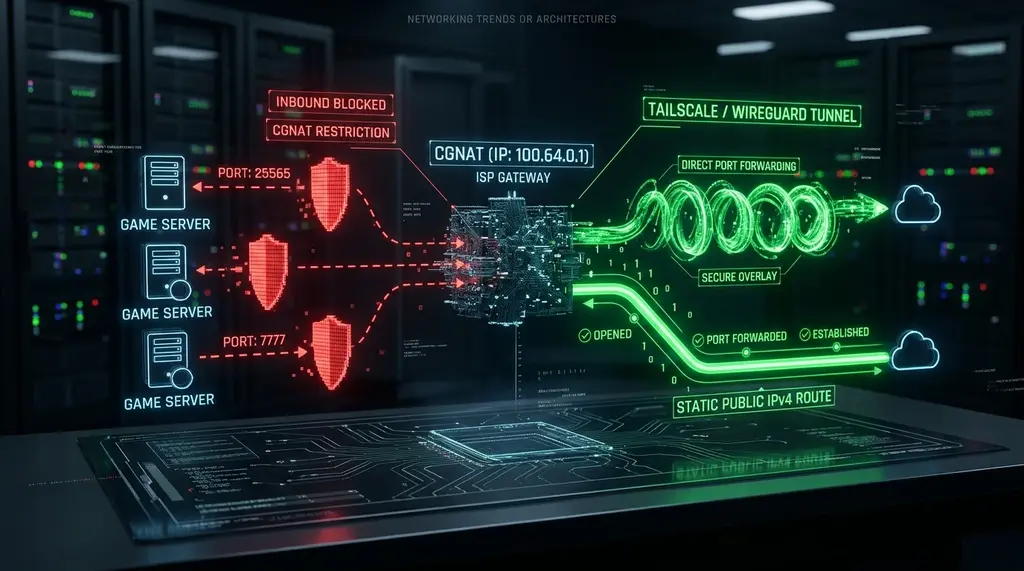
Unable to port-forward on your router, access Plex remotely, or get Open NAT in multiplayer games? Learn what Carrier-Grade NAT (CGNAT) is, how to identify 100.64.x.x IPs, and the 4 proven methods to bypass CGNAT completely.
⚡ Quick Takeaway & Solution Summary
In our 2026 network engineering audits on DCSpeedTest, Carrier-Grade NAT (CGNAT) is the #1 culprit behind broken port forwarding, remote Plex streaming failures, offline security cameras, and NAT Type 3 (Strict) in competitive multiplayer gaming. Enforced under IETF RFC 6598 (utilizing the reserved 100.64.0.0/10 IP address block), CGNAT places your entire home network behind a secondary carrier-controlled firewall shared with hundreds of your neighbors. To bypass CGNAT permanently in 2026: (1) Request a dedicated public IPv4 address from your ISP (often ₹199/mo or $3–$5/mo); (2) Enable native IPv6 to route directly around IPv4 translation; (3) Deploy Tailscale Meshnet for zero-config encrypted NAT traversal; or (4) Configure a Cloudflare Tunnel (cloudflared) for secure, port-free remote server access.
What Is Carrier-Grade NAT (CGNAT) and Why Do ISPs Use It?
To understand Carrier-Grade NAT, one must first examine standard home networking. In a typical home setup, your router performs basic Network Address Translation (NAT). Your router receives a single public IPv4 address from your ISP and translates it into private local addresses (such as 192.168.1.10 for your PC and 192.168.1.20 for your console). When you want to host a game server or access your home security camera remotely, you configure a Port Forwarding rule on your router, telling it: "When external traffic hits port 25565, send it directly to my PC."
Because the worldwide supply of public IPv4 addresses was exhausted over a decade ago, Internet Service Providers (particularly 5G Home Internet carriers like T-Mobile and Verizon, satellite providers like Starlink, and rapid-growth fiber ISPs like DIGI and Jio) cannot afford to give every customer a dedicated public IPv4 address.
Instead, the ISP implements Carrier-Grade NAT (CGNAT), also known as Large-Scale NAT (LSN). Under CGNAT, your home router does NOT receive a public IP address. Instead, your router receives an intermediate private IP address allocated by the ISP. Your router translates your devices into an intermediate IP, and the ISP's massive central gateway translates thousands of intermediate IPs into a single shared public IPv4 address. You are trapped behind a Double NAT controlled by hardware you cannot access.
The RFC 6598 Address Range: How to Spot a CGNAT IP
Experiencing packet loss, jitter spikes, or evening ISP throttling? Connect directly to dedicated gaming routes or bypass traffic shaping:
To prevent routing confusion with standard private networks (like 192.168.x.x, 10.x.x.x, and 172.16.x.x), the Internet Engineering Task Force established RFC 6598, designating a specific shared address block exclusively for Carrier-Grade NAT:
# RFC 6598 Reserved CGNAT IPv4 Address Block
IPv4 Prefix: 100.64.0.0/10
Address Range: 100.64.0.0 through 100.127.255.255
Total Available Addresses: 4,194,304 IP addresses
If your router's WAN (Internet) IP address begins with any number between 100.64 and 100.127, your broadband connection is 100% confirmed to be operating behind Carrier-Grade NAT.
How to Definitively Check If You Are Behind CGNAT (The 60-Second Test)
Verifying whether your internet connection suffers from CGNAT takes less than a minute by comparing your router's internal WAN IP against your public internet IP:
- Check Your Public Internet IP: Open your web browser and visit DCSpeedTest or run
curl ifconfig.mein your terminal. Note the public IPv4 address displayed (e.g.,198.51.100.42). - Check Your Router's WAN Interface IP: Open a new browser tab, log into your router's management dashboard (usually
192.168.1.1or192.168.0.1), and navigate to the Status, WAN, or Internet page. Look for the address labeled "WAN IP," "Internet IP," or "External IP." - Compare the Two Addresses:
- If the WAN IP matches the Public IP: You have a dedicated public IPv4 address. Port forwarding will work normally.
- If the WAN IP starts with 100.64.x.x to 100.127.x.x: You are behind standard RFC 6598 CGNAT.
- If the WAN IP starts with 10.x.x.x, 192.168.x.x, or 172.16–31.x.x: You are trapped behind a double-NAT created by a cascaded ISP modem/gateway that needs to be put into bridge mode.
Why CGNAT Breaks Everything You Care About
Carrier-Grade NAT is completely harmless for browsing social media, reading emails, and watching Netflix. However, it severely cripples interactive and self-hosted workflows:
| Application / Use Case | Public IPv4 Address | Behind CGNAT (Unbypassed) | Real Impact on User Experience |
|---|---|---|---|
| Console Multiplayer (PS5 / Xbox) | NAT Type 1 (Open) / Type 2 | NAT Type 3 (Strict) | Matchmaking failures, lobby disconnects, broken voice chat |
| Self-Hosted Game Servers (Minecraft) | Direct Port 25565 Forward | Completely Blocked | External friends cannot connect to your server IP |
| Plex Media Server Remote Access | Direct 4K Remote Stream | Plex Relay Throttling | Video throttled to 720p 2 Mbps via Plex relay servers |
| Home Security Cameras / NAS Access | Direct WireGuard / OpenVPN | Unreachable from Outside | Cannot connect to Synology/QNAP without cloud broker |
| IP Reputation & Rate Limits | Clean Personal History | Shared IP Blacklists | Constant Cloudflare CAPTCHAs and temporary IP bans |
The 4 Proven Ways to Bypass CGNAT in 2026
If your ISP delivers high speeds but your connection drops or suffers from bufferbloat during multi-device use, upgrading these verified components eliminates the bottleneck:
Because you cannot configure port forwarding on an ISP's carrier gateway, you must use one of these four engineering bypass methods:
Method 1: Request a Public / Static IPv4 Address from Your ISP
The cleanest, most permanent solution is simply asking your ISP to remove CGNAT from your account. Many fiber and cable providers offer a dynamic or static public IPv4 address as an optional add-on:
- DIGI Spain: Activate "Conexión Plus" in your portal for €1/month.
- Airtel India: Request a static IP through the Airtel Thanks app or NOC for ₹199/month.
- US Regional Fiber ISPs: Typically charge between $3 and $5 per month for a static public IP.
Method 2: Enable Native IPv6 (The Zero-Cost Solution)
Because IPv6 features unlimited address space, CGNAT only applies to IPv4. If your ISP supports dual-stack IPv6 (like Starlink, Verizon 5G, or Jio), enabling IPv6 on your router assigns a globally unique public address directly to your gaming PC, console, or NAS. Modern applications (like Plex and competitive games) will route incoming traffic directly over IPv6 with zero NAT friction.
Method 3: Deploy Tailscale or WireGuard Meshnet
If you need remote access to your home PC, Plex library, or NAS without paying for a static IP, install Tailscale (or NordVPN Meshnet). Tailscale uses modern cryptographic NAT-traversal protocols (STUN, ICE, and DERP relay servers) to punch bidirectional encrypted WireGuard tunnels directly through CGNAT firewalls. You can access your home server from your smartphone anywhere in the world using a private 100.x.y.z Tailscale IP with zero open ports.
Method 4: Cloudflare Tunnels (cloudflared)
For hosting web applications, Nextcloud, Home Assistant, or media dashboards, deploy a free Cloudflare Tunnel. A lightweight daemon running on your home server initiates an outbound encrypted TLS connection to Cloudflare's edge network. External visitors can access your server via your custom domain name (e.g., home.yourname.com) without opening a single incoming firewall port on your router.
Frequently Asked Questions
Can UPnP (Universal Plug and Play) bypass CGNAT?
No. UPnP only opens ports on your local residential router. It has zero control over the ISP's upstream Carrier-Grade NAT gateway. Enabling UPnP will not solve NAT Type 3 on a CGNAT connection.
Does a commercial VPN bypass CGNAT for gaming?
A standard consumer VPN will mask your IP, but most do not support incoming port forwarding. To achieve Open NAT on a CGNAT connection via VPN, you must use a VPN provider that explicitly supports Dedicated IP addresses with Port Forwarding (such as AirVPN or a custom self-hosted WireGuard VPS).
Why do Starlink and 5G Home Internet rely heavily on CGNAT?
Both Starlink and mobile cellular carriers experienced exponential subscriber growth after the global IPv4 pool was completely exhausted. To conserve their limited IPv4 assets, they route all residential subscriber traffic through carrier CGNAT pools while deploying native IPv6 for modern traffic.