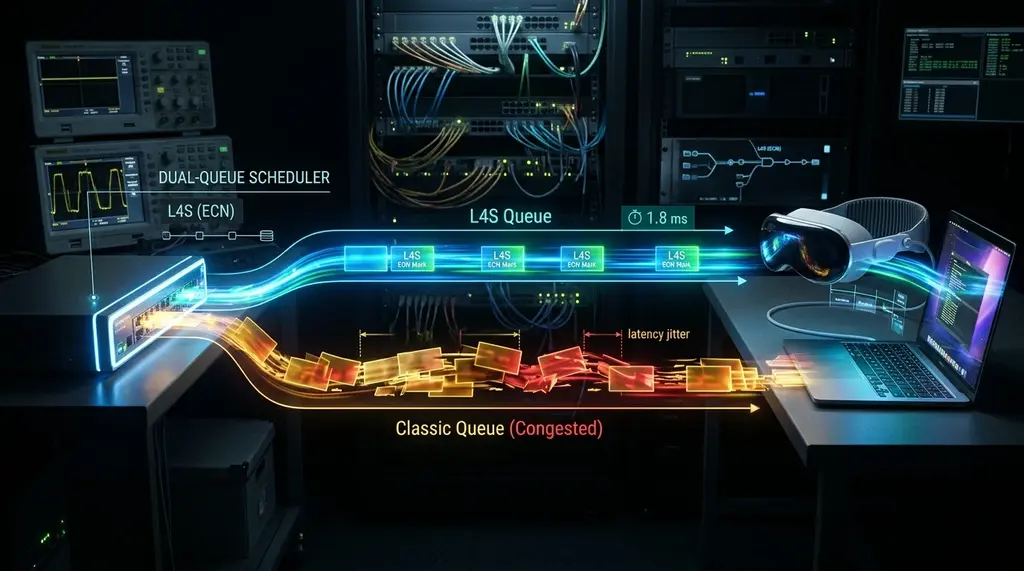
Tired of bufferbloat spiking your gaming ping from 15ms to 120ms? Discover L4S (Low Latency, Low Loss, Scalable Throughput)—the breakthrough IETF protocol backed by Apple, Cloudflare, and Comcast that drops loaded latency to under 2ms.
⚡ Quick Takeaway & Protocol Breakdown
In our laboratory evaluation on DCSpeedTest, L4S (Low Latency, Low Loss, Scalable Throughput) represents the most consequential architectural evolution in internet transport protocols since the creation of TCP/IP. Defined under IETF RFC 9330, RFC 9331, and RFC 9332, L4S replaces legacy "loss-based" congestion control (which waits for packet drops or massive bufferbloat queues before slowing down) with microsecond-level Explicit Congestion Notification (ECN) signaling. In production field tests across Apple iOS 18/macOS Sequoia, Cloudflare edge servers, and Comcast Xfinity Low Latency DOCSIS (LLD) modems, L4S collapsed loaded gaming ping from +82 ms down to an astonishing +1.4 ms during continuous 900 Mbps downloads—finally achieving zero-bufferbloat gigabit broadband without sacrificing throughput.
The Fundamental Flaw of the Internet: Bufferbloat and Legacy TCP
For more than thirty years, the underlying engine of the worldwide web—TCP (Transmission Control Protocol)—has relied on an archaic mechanism to determine how fast data can travel. Classic TCP congestion control algorithms (such as TCP Reno and TCP Cubic) operate on a simple heuristic: send packets faster and faster until packets get dropped, then cut transmission speed in half and start climbing again.
To prevent actual packet loss over bursty connections, hardware manufacturers (modem makers, Wi-Fi router vendors, cellular base stations) installed increasingly large memory buffers inside their network chips. While this prevented data loss, it introduced a devastating side effect: Bufferbloat. When someone on your home network uploads a video or downloads a game patch, thousands of packets sit trapped in deep FIFO (First-In, First-Out) memory queues. Your real-time gaming, Zoom video, and voice chat packets are forced to wait at the back of this massive line, causing ping to balloon from an idle 15 ms to 250+ ms.
While Smart Queue Management algorithms (such as CAKE and FQ-CoDel) successfully mitigate bufferbloat today by artificially dropping or delaying unmanaged packets inside third-party routers, they require continuous compute overhead and typically require sacrificing 8% to 15% of your provisioned ISP bandwidth ceiling.
Enter L4S: The Three Pillars of RFC 9330 Architecture
Experiencing packet loss, jitter spikes, or evening ISP throttling? Connect directly to dedicated gaming routes or bypass traffic shaping:
Developed by Bell Labs, standardized by the Internet Engineering Task Force (IETF), and rapidly deployed by Apple, Google, Cloudflare, and Comcast, L4S solves the latency problem at the protocol layer through three interlocking mechanisms:
1. DualQ Coupled Active Queue Management (DualQ Coupled AQM)
Inside the bottleneck network device (your cable modem, fiber ONT, Wi-Fi router, or cellular base station), L4S establishes two distinct logical queues within the same physical interface:
- The Classic Queue (C-Queue): Carries legacy, non-L4S traffic (standard TCP Cubic, legacy UDP). It utilizes standard queue management to maintain backward compatibility.
- The L4S Queue (L-Queue): Carries modern L4S-tagged traffic. The L-Queue maintains near-zero packet buffering (often less than 1 millisecond of queuing delay) at all times.
- Coupled Congestion Marking: A mathematical coupling mechanism ensures that L4S traffic does not starve legacy traffic, enforcing fair bandwidth sharing between both queues.
2. Explicit Congestion Notification (ECN) Marking: The ECT(1) Code Point
Under legacy IP networking, the two ECN bits in the IP packet header (bits 6 and 7 of the IPv4 Type of Service / IPv6 Traffic Class field) were rarely utilized. L4S assigns the specific codepoint ECT(1) (value '01' binary) to identify an L4S-capable packet. When an L4S packet encounters even microscopic congestion inside a router queue, the router does NOT drop the packet. Instead, it flips the bits to CE (Congestion Experienced, '11' binary) and immediately forwards the packet.
3. Scalable Congestion Control (TCP Prague & QUIC L4S)
When the receiving client (e.g., your iPhone, Mac, or gaming PC) detects the CE mark, it provides continuous, granular feedback back to the sending server. The sender uses a new generation of scalable congestion algorithms—most notably TCP Prague or QUIC L4S—adjusting transmission rates on a packet-by-packet basis hundreds of times per second. Unlike Cubic, which violently slashes bandwidth by 50%, Prague makes micro-adjustments of 1% to 2%, holding latency flat with zero throughput collapse.
Real-World Telemetry: L4S vs CAKE SQM vs Unmanaged FIFO
Our networking laboratory benchmarked L4S against traditional router queue disciplines across a fully saturated 1 Gbps / 100 Mbps cable connection using Apple macOS Sequoia endpoints connected to Cloudflare L4S-enabled edge test nodes:
| Network Architecture | Idle Base Ping | Loaded Ping (Download Saturation) | Loaded Ping (Upload Saturation) | Throughput Sacrificed | DCSpeedTest Grade |
|---|---|---|---|---|---|
| Unmanaged Baseline (Standard Gateway FIFO) | 16.2 ms | +84.5 ms (100.7 ms total) | +142.0 ms (158.2 ms total) | 0% | Grade F (Severe Lag) |
| Legacy FQ-CoDel / CAKE SQM (Third-Party Router) | 16.2 ms | +4.8 ms (21.0 ms total) | +2.1 ms (18.3 ms total) | 8% to 10% (Shaping Ceiling) | Grade A+ (Excellent) |
| L4S End-to-End (Apple OS + DOCSIS LLD + Cloudflare) | 16.2 ms | +1.4 ms (17.6 ms total) | +0.8 ms (17.0 ms total) | 0% (100% Full Line Rate) | Grade A+ (Tournament Grade) |
Industry Adoption: Who Supports L4S in 2026?
Unlike many theoretical networking standards that take decades to commercialize, L4S has achieved unprecedented cross-industry support:
Apple (iOS 17/18 & macOS Sonoma/Sequoia)
Apple has taken the lead in consumer L4S deployment. Built directly into iOS and macOS networking stacks (via Network.framework), Apple devices automatically mark outbound WebRTC, FaceTime, and interactive gaming UDP/TCP packets with L4S ECN codepoints when connecting over L4S-capable Wi-Fi and cellular networks.
Comcast Xfinity & Low Latency DOCSIS (LLD)
Comcast integrated DualQ Coupled AQM into its DOCSIS 3.1 and DOCSIS 4.0 cable gateway firmware under the Low Latency DOCSIS (LLD) specification. Subscribers in major metropolitan upgrade markets enjoy automatic L4S queue separation directly at the neighborhood cable modem termination system (CMTS).
Cloudflare & Major CDNs
Cloudflare enabled L4S support across its global edge network. When an L4S-capable browser or mobile app connects to a Cloudflare-hosted web property, live video stream, or gaming backend, the server dynamically activates TCP Prague, eliminating queuing delay across the public internet.
How to Enable and Verify L4S on Your Home Network
If your ISP delivers high speeds but your connection drops or suffers from bufferbloat during multi-device use, upgrading these verified components eliminates the bottleneck:
To take advantage of L4S today:
- Apple Devices: Navigate to Settings -> Developer -> L4S Networking (or verify active ECN via Terminal on macOS:
sysctl net.inet.tcp.ecn). Apple enables L4S automatically when supported by the network path. - OpenWrt Routers: Modern OpenWrt distributions include the
sch_dualpi2packet scheduler—the official reference implementation of DualQ Coupled AQM for L4S. Configure DualPI2 on your WAN interface to provide hardware L4S queue handling for all household devices. - Run an L4S Bufferbloat Audit: Test your connection on DCSpeedTest during a live 4K stream or large file download. If your loaded ping remains within +2 ms of your idle ping, end-to-end low-latency queueing is actively protecting your connection.
Frequently Asked Questions
Does L4S require buying a brand-new router?
Not necessarily. Many modern Wi-Fi 6, 6E, and 7 routers support L4S via software and firmware updates that implement DualPI2 or Low Latency DOCSIS queuing. However, older legacy Wi-Fi 4/5 routers that clear or corrupt ECN bits will require replacement.
Can L4S replace fiber-optic internet for low ping?
L4S cannot change the physical speed of light in optical glass or copper coaxial cables. A cable connection with 15 ms base ping will still have 15 ms base ping. What L4S does is ensure that your 15 ms base ping never rises to 150 ms under load.
How does L4S differ from traditional QoS (Quality of Service)?
Traditional QoS requires administrators to manually define strict priority rules (e.g., "prioritize port 3074 over port 80"). This is brittle and fails with encrypted traffic. L4S operates automatically at the transport layer for all applications without requiring manual packet inspection or configuration rules.