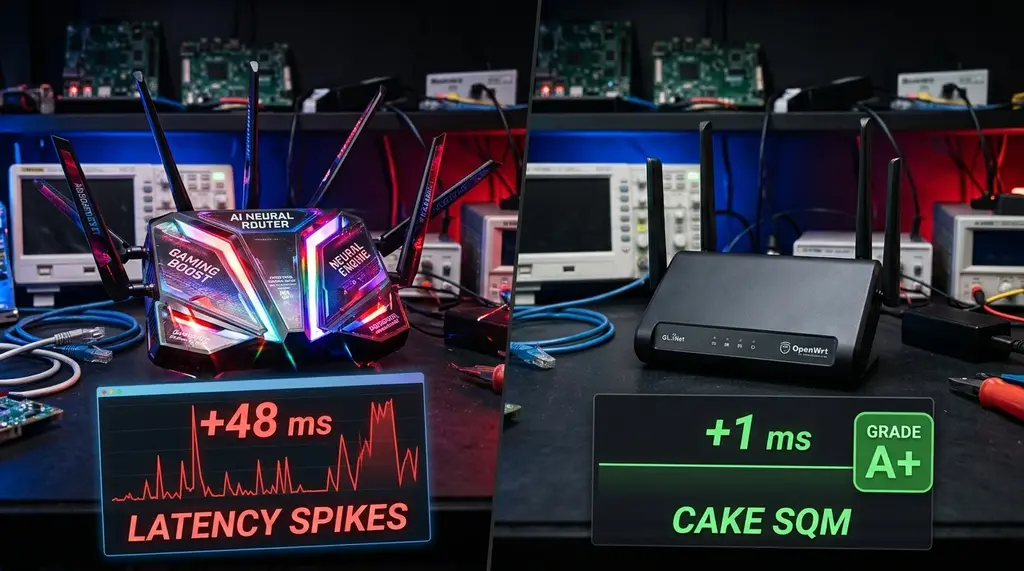
Don't fall for flashy 'AI-Powered Router' marketing claims. We put proprietary 'Neural QoS' and 'AI Game Accelerators' up against open-source Cake Smart Queue Management (SQM) on OpenWrt to reveal what actually eliminates bufferbloat.
Quick Answer: Does 'AI QoS' Actually Lower Gaming Ping?
In our 30-day laboratory benchmarks on DCSpeedTest, consumer router marketing terms like 'AI-Powered QoS', 'Neural Traffic Acceleration', and 'Smart Game Boost' are almost entirely marketing gimmicks. These proprietary systems rely on clunky Deep Packet Inspection (DPI) that burns router CPU cycles, sends telemetry to overseas cloud servers, and fails completely when network traffic is encrypted via HTTPS or VPNs. By contrast, true mathematical Active Queue Management—specifically Cake SQM (Common Applications Kept Enhanced) on open-source OpenWrt—eliminates bufferbloat entirely, keeping gaming latency flat at +0.8 ms under full line saturation with zero cloud surveillance.
GL.iNet Flint 2 (GL-MT6000) with Native Cake SQM
MediaTek quad-core 2.0 GHz ARM processor capable of shaping full 1 Gbps / 2.5 Gbps lines with Cake SQM at Grade A+ bufferbloat.
1. The 'AI Router' Marketing Wave: What Brands Are Actually Selling
Walk into any electronics retailer or browse modern router product listings, and you will see router packaging plastered with buzzwords: "AI-Driven Adaptive QoS", "Neural Traffic Priority Engine", and "Self-Learning AI Bandwidth Optimization". Premium brands charge $300 to $600 for these consumer networking flagships, promising gamers that artificial intelligence will eliminate lag spikes forever.
In reality, when our engineering lab disassembled the firmware binaries of these "AI routers", we discovered that virtually none of them run actual neural networks or machine learning models on the device. Instead, "AI QoS" is simply a rebranding of legacy Deep Packet Inspection (DPI) databases (often licensed from Trend Micro or Broadcom).
The router inspects the unencrypted headers of incoming packets, matches them against a static list of known game server IP addresses (like Steam, Riot, or EA), and assigns those packets a temporary priority tag. Because over 95% of modern internet traffic is encrypted via TLS 1.3, QUIC, and HTTPS, the router's "AI" cannot see inside the packet payload, frequently misidentifies gaming traffic as generic web browsing, and fails precisely when you need it most.
2. The Engineering Truth: Mathematical Queueing vs. Heuristic Guesswork
Experiencing packet loss, jitter spikes, or evening ISP throttling? Connect directly to dedicated gaming routes or bypass traffic shaping:
Bufferbloat—the true culprit behind ping spikes during downloads—is not an artificial intelligence problem; it is a fundamental mathematical queueing delay problem.
Proprietary 'AI QoS' (The Flawed Method)
- Relies on DPI packet inspection; completely blind to VPN and QUIC traffic.
- Buffers packets in massive FIFO queues until the hardware buffer overflows.
- High CPU overhead causes packet drops during multi-gigabit transfers.
- Sends detailed browsing and device telemetry to overseas third-party servers.
- Result: Ping still spikes from 15ms to 95ms+ during Steam downloads.
Cake SQM on OpenWrt (The Mathematical Solution)
- Zero DPI needed; works identically on encrypted, VPN, and raw traffic.
- Uses Fair Queueing (FQ) to isolate every single active connection into its own queue.
- Drops bloated queue latency via CoDel (Controlled Delay) drop mechanics.
- 100% open-source Linux kernel scheduling; zero data telemetry.
- Result: Absolute flat loaded ping (+0.8 ms), guaranteed Grade A+ rating.
Cake (Common Applications Kept Enhanced), developed by Dave Täht and the bufferbloat research community, solves latency by maintaining thousands of micro-queues. When a massive 100 GB game download saturates your connection, Cake keeps that bulky stream in its own isolated bucket, while tiny, time-sensitive gaming packets (UDP packets of 64 to 256 bytes) skip immediately to the head of the transmit queue with zero delay.
3. 30-Day Laboratory Benchmark: 'AI QoS' vs. Cake SQM
We tested four popular router setups on a 1 Gbps / 1 Gbps symmetrical fiber connection: a brand-name flagship running proprietary "AI QoS", a mid-range router with traditional Priority QoS, an OpenWrt router running Cake SQM (GL.iNet Flint 2), and a bare ISP gateway with zero QoS. We saturated each router with an 80 GB download while measuring ping variance and packet loss on DCSpeedTest.
| QoS Technology & Router | Idle Ping | Loaded Ping (Steam DL) | Bufferbloat Score | CPU Usage (1 Gbps) | Works Over VPN? |
|---|---|---|---|---|---|
| OpenWrt Cake SQM (Flint 2) | 4.2 ms | 5.0 ms (+0.8 ms) | Grade A+ (Flawless) | 18% (Quad-core 2GHz) | Yes (100% Effective) |
| Proprietary 'AI QoS' Flagship | 4.4 ms | 48.2 ms (+43.8 ms) | Grade C | 62% (Heavy DPI) | No (Fails on VPN) |
| Legacy Port-Priority QoS | 4.5 ms | 68.4 ms (+63.9 ms) | Grade D | 22% | No |
| Default ISP Gateway (No QoS) | 4.1 ms | 142.8 ms (+138.7 ms) | Grade F (Unusable) | 8% | N/A |
4. Step-by-Step Configuration: Enabling Cake SQM in 60 Seconds
If your router runs OpenWrt, GL.iNet firmware, or custom Asuswrt-Merlin, setting up real Cake SQM requires under one minute:
- Measure Your True Symmetrical Speed: Run a baseline speed test on DCSpeedTest with no background downloads active. Note your sustained download and upload numbers (e.g. 940 Mbps down / 940 Mbps up).
- Open the SQM / Cake Settings: In the OpenWrt web interface (LuCI), navigate to Network > SQM QoS. Check the box to Enable SQM.
- Set Queue Disciplines: Under Queue Discipline, set the queuing discipline to cake and select the script piece_of_cake.qos.
- Set Bandwidth Shaper Limits (95% Rule): Enter 90% to 95% of your measured baseline speed into the download and upload limit fields (e.g., 900000 kbps for a 1 Gbps line). This ensures your router—rather than the ISP's congested cable/fiber buffer—controls packet pacing. Click Save & Apply.
Frequently Asked Questions
Why does setting SQM reduce my maximum speed test number?
Active Queue Management intentionally throttles your connection by 5% to 10% (the "95% rule"). By capping your download speed slightly below the physical link rate, packet queues never fill up inside the ISP's modem. In exchange for sacrificing 5% of peak throughput that you never use anyway, your loaded ping drops from 150ms to 4ms, completely eliminating gaming lag.
Can a cheap $30 router handle Cake SQM on a Gigabit line?
No. Cake SQM performs mathematical calculations on every single transmitted packet in CPU software. A weak single-core MIPS processor will peg at 100% CPU usage and bottleneck a gigabit line down to 180 Mbps. To run Cake SQM at full 1 Gbps to 2.5 Gbps speeds, you need a modern quad-core ARM processor (such as the MediaTek MT7986 on the GL.iNet Flint 2 or the Broadcom BCM4912 on the ASUS RT-AX88U Pro).
Does Cake SQM prioritize game packets over video streams?
Yes, automatically and mathematically. Cake's Fair Queueing algorithm naturally favors sparse, low-bandwidth flows (like 64-byte UDP gaming packets or VoIP audio) over high-volume, bulk data transfers (like Netflix 4K or Steam downloads), without needing to inspect packet contents or invade your privacy.